
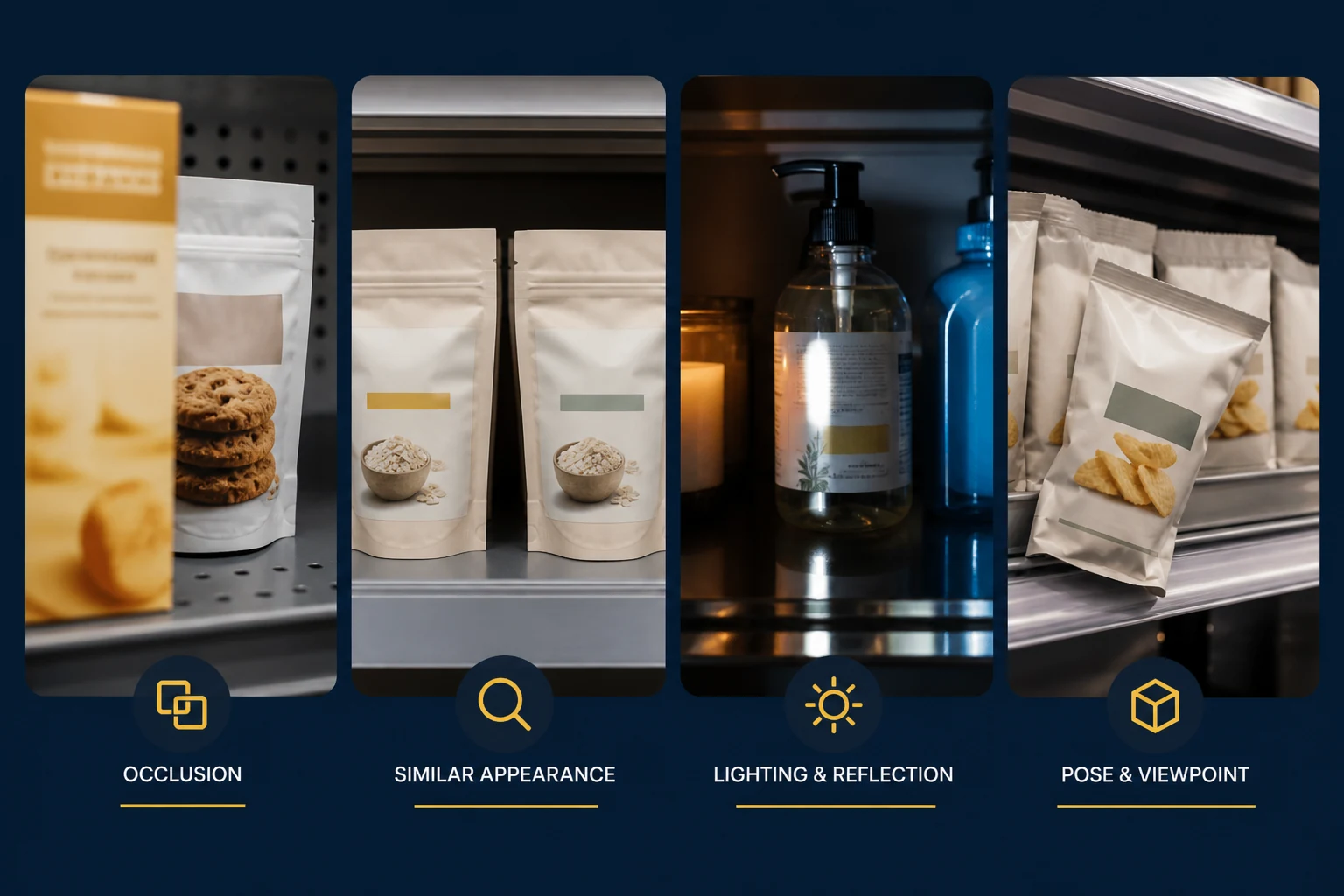
The validation set looks clean. Products face the camera. Lighting stays within a narrow range. Shelf layouts are familiar. The detector clears its release threshold, so the team deploys it.
Then a shopper removes a front-row product. A package behind it becomes visible through the gap. Another item is half hidden by a price label. Afternoon glare washes out part of the shelf. A supplier rolls out seasonal packaging. The model has not changed, but the visual system around it has.
This is where aggregate validation accuracy stops being a sufficient answer. Production performance depends on whether the dataset, annotation policy, evaluation slices and surrounding product logic represent the conditions the model will actually encounter.
What is an edge case in computer vision?
An edge case in computer vision is an uncommon or difficult visual condition that differs from dominant training patterns and can materially affect production performance. It may be rare across the full dataset but frequent in a specific camera, store, shift or operating state. Severe occlusion, reflections, unusual angles, packaging changes and unexpected positions are obvious examples. Some edge cases are less visual: the model detects the correct object, but the application interprets that detection incorrectly.
“Edge case” should not become shorthand for every error. A recurring failure across a common production condition is not an edge case anymore; it is a coverage gap. Teams should name the scenario, measure its frequency and decide whether the fix belongs in data, annotation rules, model design, camera configuration or business logic.
When more random training data stops helping
A performance plateau does not automatically mean the dataset is too small. Once common scenes are well represented, another batch of similar images may add volume without adding useful evidence. The next step is to find where errors concentrate before deciding what to collect or change.
Break results down by class and by conditions already present in production: camera, lighting, occlusion, viewing angle, object size, confidence range and failure type. The purpose is not to create more dashboards. It is to answer a narrower question: what kind of evidence is the model missing? Overall performance can remain stable while one class loses recall, one camera produces most false negatives or partially hidden objects fail far more often than clear ones.
The answer determines the action. Missing scenarios may justify targeted edge cases. Confusing backgrounds may call for hard-negative review. Inconsistent labels may require corrected annotations and clearer guidance. A site-specific cluster may point to dataset or environment drift, preprocessing or camera setup. Weak evaluation coverage may require a better test slice rather than another training run.
Diagnose the plateau before collecting more data
Group the failures, identify the missing evidence and choose an action that matches the cause.
- Model performance plateausConfirm where the metric has stopped improving.
- Analyze and group failuresCompare classes, scenarios, cameras and error types.
- Identify the likely root causeSeparate missing coverage from label, input and system problems.Possible root-cause categories:Data: select targeted examplesLabels: review rules and correctionsSystem: fix input, pipeline or threshold
- Apply the smallest useful changeRetrain only when the diagnosis supports retraining.
- Re-evaluate and monitorTest the affected slice and confirm common cases did not regress.
1. Partial visibility and occlusion
Occlusion changes both what the model can see and what annotators believe they should label. A product may be partly behind another object, cropped by the frame or covered by a hand. One reviewer draws a box around the visible pixels. Another estimates the full object extent. A third excludes it because only a small fragment remains.
When does an object become too hidden to annotate?
There is no universal percentage that works for every system. A safety model may need to label any visible pedestrian evidence. A retail recognition model may exclude a package when the distinguishing text is hidden. The rule should reflect intended model behavior and be applied consistently. Teams need to specify whether boxes cover visible area or estimated extent, how truncation differs from occlusion, which attributes record visibility, and when a case must be escalated.
More occluded images will not help if their labels encode conflicting policies. This is why annotation guidelines are part of model design, not merely annotator documentation.
2. Front-row and back-row confusion
Consider a shelf camera watching one product position. A customer removes the front package. The detector now sees a second package behind it through the gap and correctly identifies its class. From an object-detection perspective, that prediction can be right. From an availability perspective, the front position is empty.
Detection ≠ Shelf Availability. A detection reports visual evidence for an object. Availability may require position, depth, prior state and shelf context.
This distinction matters well beyond retail. A safety camera can detect a person without knowing whether they crossed a restricted boundary. A manufacturing detector can identify a part without knowing whether it is seated correctly. In each case, the detection must be interpreted using position, prior state and operating context.
Training another detector is not always the answer. Teams may need position-aware labels, temporal state, a separate empty-slot class, camera geometry or downstream logic. A technically correct detection can still produce the wrong operational conclusion. Our real-world retail computer vision workflow examines this distinction in an operational pipeline.
3. Visually similar objects
Two classes can share package shape, brand colors, typography, cap design, label layout and physical dimensions. In a product photograph, the difference is obvious. At the production camera distance, it may occupy only a few pixels. Compression, glare or partial visibility can remove it entirely.
Do our training images preserve the features that actually distinguish these classes under deployment conditions?
If the answer is no, adding more clean catalog images may make the validation number look better without resolving the production ambiguity. Useful tests include class-pair confusion matrices, crops at expected deployment resolution, hard-negative sets and review of whether the taxonomy asks the model to separate classes that the camera cannot reliably distinguish.
Sometimes the right response is better data. Sometimes it is a higher-resolution camera, OCR, a hierarchical label scheme or a decision to collapse classes. Annotation cannot recover visual evidence that the sensor never captured.
4. Lighting and reflections
People recognize objects under shadows, glare, warm store lighting, cool warehouse LEDs and changing daylight because they use broad contextual cues. A model sees a changed pixel distribution. Reflective packaging can erase text, create false boundaries or reproduce nearby objects on a glossy surface. Dark shelf corners hide contours; overexposure removes texture.
A robust evaluation set should separate lighting conditions instead of averaging them together. Teams can inspect performance for high glare, low light, mixed color temperature, strong shadows and exposure extremes. Augmentation may help, but synthetic brightness changes do not always reproduce real reflections, sensor noise or automatic-exposure behavior.
The practical check is simple: collect examples from every actual lighting regime and compare them with the training distribution. If failures cluster by site or time of day, the problem may be environmental before it is architectural.
5. Unexpected object positions
Objects fall, tilt, rotate, move outside their expected region or appear on the wrong shelf. Cameras shift slightly after cleaning or maintenance. Store fixtures move. A conveyor part arrives at an orientation not represented during training.
Models can learn positional shortcuts: “this class usually appears in the upper-right region” or “defects occur near this fixture.” Those shortcuts can improve validation results when the split shares the same layout, then fail when deployment changes. Random image-level splits are especially vulnerable when near-identical camera scenes appear in both training and validation.
Test by camera, site, layout and time period—not only by random image. Include misplaced and tilted objects intentionally. If location is legitimately part of the task, encode and evaluate it explicitly rather than letting the model learn it accidentally.
6. Packaging and appearance changes
Packaging redesigns, seasonal artwork, promotional stickers, logo changes, label-color changes and new product sizes create dataset shift even when the underlying product is unchanged. A classifier trained on last year’s design may treat the new appearance as another class or fail to detect it.
This is why production datasets require maintenance. Teams need a route for identifying new appearances, collecting examples, updating class definitions and deciding whether old and new packaging belong to one class. Catalog metadata can help signal expected changes, but visual samples still need review under deployment conditions.
A versioned edge-case set makes the change visible. Without one, performance on redesigned packages can disappear inside a large aggregate metric dominated by unchanged products. The separate guide to golden evaluation datasets covers how to protect and version those benchmark cases.
7. Camera and deployment changes
A model validated on one mounting angle is not automatically validated for every installation. Focal length, sensor resolution, exposure, compression, focus, calibration and physical placement all affect the image delivered to the model. Two nominally identical cameras can still produce different results after installation.
Camera drift is easy to misdiagnose as model drift. Before retraining, compare current image characteristics with the validated configuration. Check field of view, pixel density at the object, blur, exposure histograms, compression artifacts and calibration. Treat installation acceptance testing as part of model validation.
For multi-site deployments, create evaluation slices by camera type and environment. A single pooled score can conceal one poorly positioned camera that produces most operational failures.
Edge cases are also annotation problems
Collecting difficult images is useful only if teams turn them into consistent training and evaluation evidence. If annotators disagree about a half-visible object, an empty position or a redesigned package, the model receives noise precisely where the decision is hardest.
The rule update matters. It turns one correction into repeatable policy. The case can then be added to reviewer calibration, audited across existing data and included in the next validation set. For operational handling of unresolved labels, use the separate computer vision edge-case escalation workflow.
Build an edge-case library
An edge-case library is a versioned collection of difficult production samples grouped by failure condition. It should preserve the original input, expected interpretation, annotation decision, model version, camera or site context and resolution status where practical.
Evaluate model versions against these categories independently. Aggregate accuracy can improve while performance on glare or severe occlusion gets worse. Slice-level reporting makes that trade-off visible and helps teams decide whether a release is genuinely safer for production.
Pay special attention to high-confidence mistakes
A low model score already signals uncertainty. A wrong prediction with a high score is often more informative because the model appears to have found a strong—but incorrect—pattern. These failures can reveal confusing classes, missing training scenarios, annotation inconsistency, distribution shift, model shortcuts or calibration problems.
A confidence score is not probability or certainty. “0.95 confidence” should not automatically be read as “95% certainty.” Its meaning depends on the model, scoring function and calibration. Compare score ranges with observed correctness on representative production slices before using them for automation thresholds.
Review high-score errors by class pair and environment. Ask what visual feature supported the prediction, whether that feature is stable in production and whether the reference label itself is defensible. Sometimes the apparent model error exposes an annotation-policy disagreement.
Turn hard examples into a diagnostic feedback loop
The familiar development cycle ends at deployment: collect, annotate, train, validate, deploy. A production system needs a second loop that begins there.
Monitor inputs, outputs and operational exceptions.
Preserve the input, prediction and deployment context.
Group by class, scenario, camera and failure type.
Check data coverage, labels, input quality and system logic.
Choose targeted data, correction or an engineering fix.
Test the affected slice, common cases and production behavior.
The loop should distinguish data problems from other causes. Some failures require annotation or new samples. Others require camera maintenance, preprocessing, threshold calibration, model changes or product logic. The purpose of review is diagnosis, not an assumption that every error needs more labels.
What should teams test before deployment?
- Partial visibility and severe occlusion
- Unusual positions and orientations
- Difficult lighting and reflections
- Visually similar classes
- Empty spaces and background objects
- Packaging and appearance variations
- Camera, resolution and compression changes
- High-confidence wrong predictions
- Annotation disagreements
- Performance by site, camera and scenario
Keep the list short enough to run for every meaningful release. A checklist that no one can execute is not a control.
Use the failure pattern to define the next evidence
The cleanest image is not always the most valuable training example. Difficult images reveal what the current system still fails to distinguish: visibility, class-specific features, position, camera conditions or operational context. Once that failure pattern is named, teams can improve the appropriate layer—training data, annotation rules, evaluation coverage, model behavior or production logic—instead of ordering another undifferentiated batch of images.
Frequently asked questions
What is an edge case in computer vision?
An edge case is an uncommon or difficult visual condition that differs from dominant training patterns and can materially affect production performance.
Why do computer vision models perform worse in production?
Production introduces variation that validation data may not represent, including occlusion, lighting, camera changes, new packaging, unusual positions and dataset shift.
Can better annotation improve edge-case performance?
Yes, when the problem is missing or inconsistent labels. Better annotation cannot fix every modeling or business-logic problem, but clear rules make difficult examples more useful.
How should teams find computer vision edge cases?
Review production failures by scenario, inspect high-confidence mistakes, sample across deployment environments and maintain a categorized edge-case library.
Should edge cases be included in validation datasets?
Yes. Maintain representative edge-case slices and report them separately from aggregate validation results.
What are high-confidence model errors?
They are wrong predictions accompanied by a high model score. The score is not certainty, but these errors can expose class confusion, shortcuts, dataset shift or calibration problems.
Related articles
Working through a difficult computer-vision failure pattern?
Share a representative sample, the affected scenario and the current annotation rules for a focused review.