
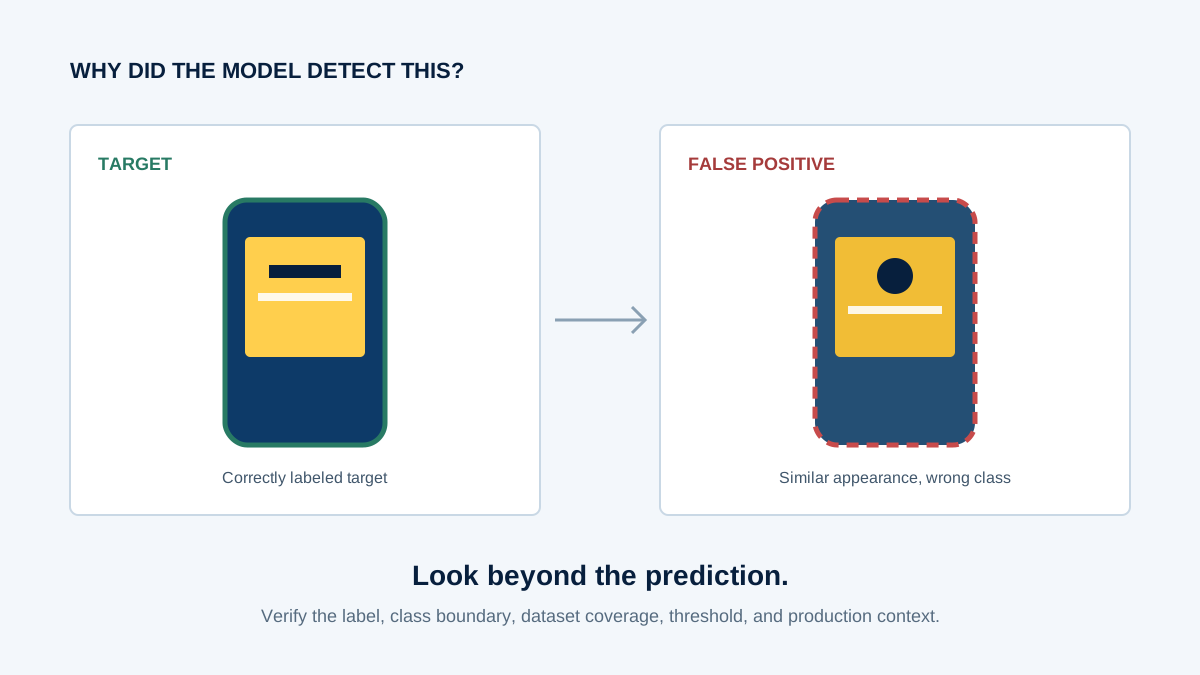
An object detector is trained to recognize a target product. In production, it repeatedly assigns the same class to a similar-looking package. Some predictions carry high scores. The first response is often to collect more photographs of the correct product.
That response may miss the actual weakness. The detector might already understand the target reasonably well. What it has not learned is where the boundary lies between the target and a convincing non-target. The missing information is negative.
False positives are not one problem with one fix. They can begin in the dataset, labels, model output, camera pipeline, evaluation design, or application logic. Before retraining, classify the failure and test the most plausible cause.
What is a false positive in computer vision?
A false positive occurs when a model predicts that a target object or class is present when the correct ground truth says it is not.
In object detection, that can mean a box around background texture, the wrong class assigned to a real object, or a legitimate detection that should not trigger the downstream business event. Those cases look similar in an error total but require different investigations.
1. Missing hard-negative examples
Training sets often contain abundant examples of what the model should detect and too few examples of objects it must actively reject. Random empty scenes are useful, but they do not define a difficult class boundary.
A similar package, normal texture that resembles a defect, roadside object shaped like a vehicle, or graphic that resembles a logo may be much more informative. If those examples are absent, adding another large batch of clean positives can reinforce what the model already knows without addressing the confusion.
Diagnostic question: does the training set contain labeled examples of the specific non-targets producing errors, under the same conditions in which the errors occur?
2. Visually similar classes
Two classes may share shape, color, packaging, texture, typography, and overall layout. The distinguishing evidence may be a small mark, cap shape, label band, or proportion that becomes weak after resizing or partial occlusion.
Inspect confusion pairs rather than treating all false positives as one group. Compare target and confused-class crops at the resolution actually received by the model. Then ask whether the object detection training data teaches the difference across realistic distances, angles, and visibility levels.
If the feature separating two classes disappears in the model input, collecting more images at the same inadequate scale may not solve the problem. The task definition, crop strategy, resolution, or model architecture may need review.
3. Annotation inconsistency
Inconsistent bounding boxes, missing labels, ambiguous class definitions, and changing treatment of partial objects create contradictory supervision. A scene labeled as background in one batch and as the target in another asks the model to learn incompatible boundaries.
Do not assume annotation is the cause. Audit it. Review false-positive examples against the current guideline, then inspect nearby training samples and earlier guideline versions. Measure reviewer disagreement for the affected class or condition. The annotation-guideline framework explains how to turn recurring ambiguity into explicit rules.
4. Background shortcuts
A detector can use correlations that are predictive in training but incidental to the object: shelf location, background color, surface texture, signage, or a fixed camera angle. If nearly every target appears against the same background, part of the learned signal may belong to the background.
Test the hypothesis with controlled slices. Compare the target on new backgrounds, the familiar background without the target, and visually similar objects in the familiar location. A large performance difference does not by itself explain the mechanism, but it tells the team where to investigate and what counterexamples may be missing.
5. Lighting, reflections, and shadows
Glare can create bright edges. Strong shadows can resemble contours. Overexposure removes distinguishing texture, while underexposure compresses several dark classes into similar shapes. Reflections may duplicate part of an object or produce a feature that did not exist in the training environment.
Slice the errors by lighting condition and camera rather than labeling the entire class unreliable. If failures cluster under one condition, collect targeted examples and verify exposure, white balance, and preprocessing consistency. For a broader treatment of difficult visual conditions, see the production computer vision edge-case guide.
6. Confidence thresholds and calibration
Raising a confidence threshold can remove lower-scoring false positives, but it usually removes some true positives too. Threshold selection is therefore an operating-point decision, not a repair for every classification error.
A score of 0.95 should not be read automatically as “95% certainty.” Its meaning depends on the model, class, data, and calibration procedure. Evaluate threshold candidates on labeled, deployment-relevant slices and report both false positives and false negatives. A high-confidence mistake may point to class confusion, shortcut learning, label error, or missing coverage rather than a threshold that is simply too low.
7. Production distribution shift
A model may perform well on validation data yet produce more false positives after deployment because the evaluation set does not contain the new camera, location, packaging, background, behavior, or operating condition now seen in production.
Compare training, validation, and current production slices. Include camera and preprocessing versions where available. Some apparent data shift is really a crop, resize, color-conversion, or configuration change. The dataset-drift investigation guide covers the distinction in more depth.
Before retraining, diagnose the false positive
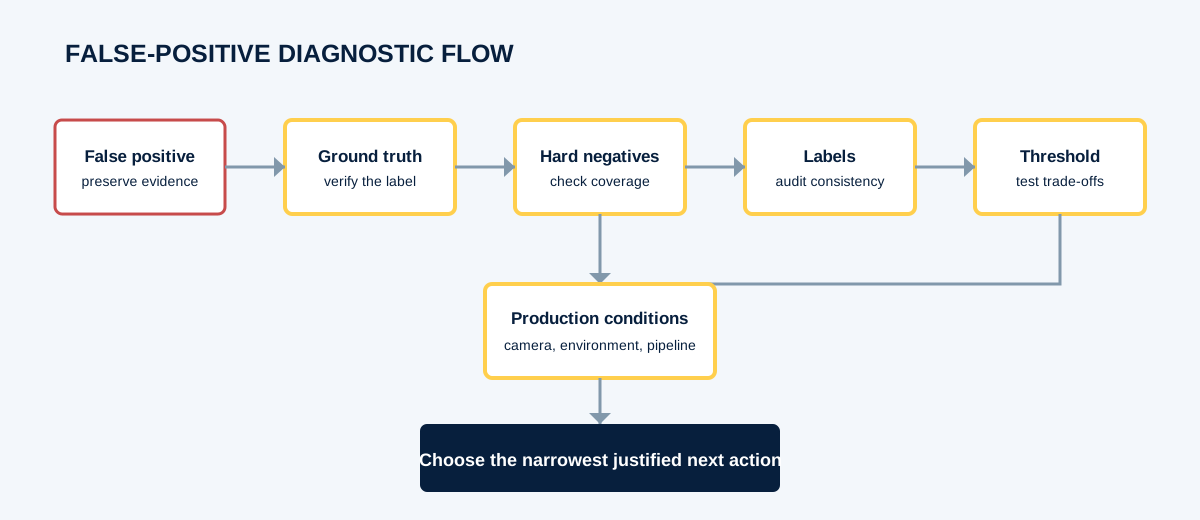
- Inspect the prediction: preserve the image, box, predicted class, score, model version, and preprocessing version.
- Categorize the failure: background detection, wrong class, duplicate box, localization error, or downstream interpretation error.
- Check ground truth: confirm the example is truly a false positive under the current policy.
- Inspect class separation: find similar classes and determine whether useful negative examples exist.
- Audit labels: compare annotation rules and reviewer decisions around the affected condition.
- Evaluate thresholds: test operating points on labeled slices, including the cost of added false negatives.
- Compare production conditions: check camera, environment, object appearance, and preprocessing changes.
- Choose the narrowest justified action: fix labels or pipeline logic, add hard negatives, adjust a threshold, collect targeted examples, or retrain and validate.
What makes a useful hard negative?
A hard negative is not simply an image without the target. It is a non-target example that resembles the target, triggers the model incorrectly, appears in deployment, or exposes a known confusion pattern.
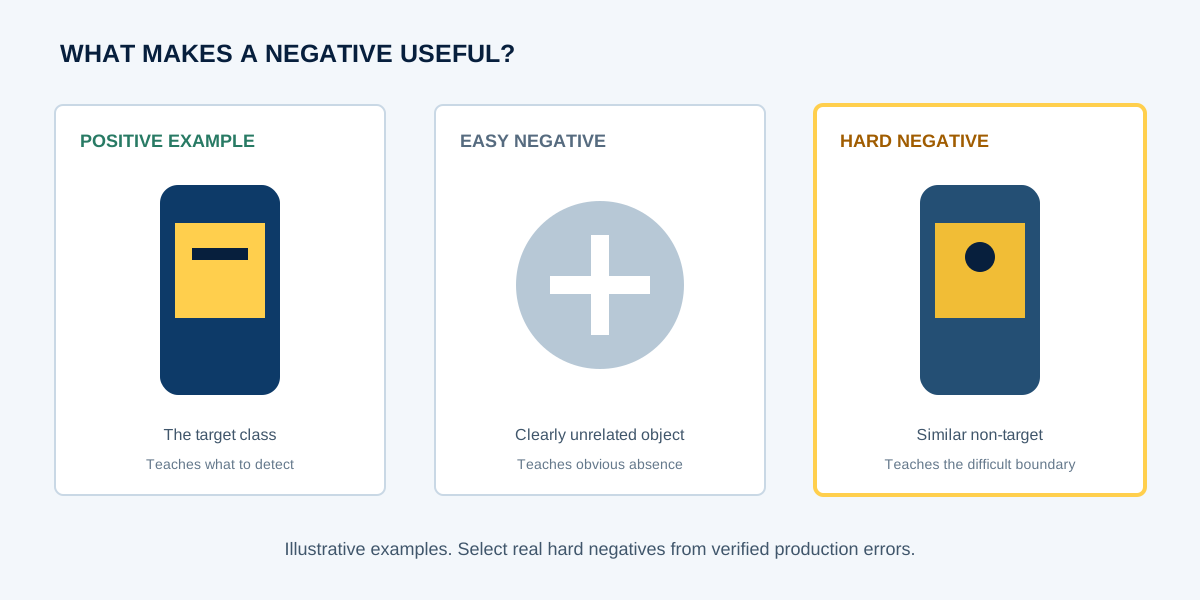
If Product B is repeatedly classified as Product A, a curated set of representative Product B examples can be more informative than another random batch of Product A. Confirm the labels, retain deployment context, remove near-duplicates, and keep a held-out slice to test whether the confusion improves.
What should you investigate next?
| Observed failure | Likely area to investigate | Possible next step |
|---|---|---|
| False positives on similar objects | Hard negatives and class separation | Collect targeted, verified negatives |
| False positives on one background | Shortcut learning | Diversify background conditions and test counterexamples |
| False positives in low light | Visual coverage and camera settings | Review the pipeline and collect targeted production samples |
| High-confidence false positives | Class confusion, calibration, or coverage | Review examples and evaluate thresholds on labeled slices |
| Annotators disagree | Annotation policy | Clarify guidelines, calibrate reviewers, and audit affected labels |
| Only production fails | Distribution or pipeline shift | Compare training, validation, and production slices |
Do not evaluate false positives with one aggregate number
An aggregate metric can hide a failure concentrated in one class, camera, environment, or business-critical scenario. A useful review separates per-class false positives, confusing class pairs, environment and lighting slices, camera or device slices, and high-confidence mistakes.
Preserve a broad random evaluation sample as well as targeted diagnostic slices. The random sample estimates general behavior; the targeted slices answer whether a known failure was fixed. Mixing them without tracking sampling intent can make either result misleading. A focused data audit can help locate annotation and coverage issues before a larger labeling cycle.
When more training data really helps
More data helps when it contributes missing information: hard negatives, new production conditions, underrepresented classes, rare scenarios, new product variants, or new environments. A larger dataset that repeats the same easy cases may leave the failure boundary unchanged.
Start from a failure taxonomy. Select examples for a stated reason, record that reason as metadata, and hold back comparable examples for evaluation. This turns collection into an experiment instead of a larger version of the existing dataset.
When to look beyond data collection
Data collection is not the answer when the central problem is annotation ambiguity, an unsuitable operating threshold, preprocessing mismatch, leakage, poor evaluation design, model architecture, calibration, duplicate suppression, or application logic.
For example, a detector can correctly see an object while downstream logic interprets the detection incorrectly. In that situation, more detection training data may leave the business error unchanged. See how detections are interpreted alongside shelf context in our retail computer vision case study.
Frequently asked questions
What causes false positives in computer vision?
Common causes include missing hard negatives, visually similar classes, inconsistent labels, background shortcuts, difficult lighting, unsuitable thresholds, and production distribution shift.
How do you reduce false positives in object detection?
Categorize the errors, verify ground truth, inspect class confusions and dataset coverage, evaluate thresholds on labeled data, and compare production conditions with training data. Apply the fix that matches the cause.
What is a hard negative in machine learning?
A hard negative is a non-target example that resembles the target or already triggers an incorrect prediction, making it useful for teaching a difficult decision boundary.
Can annotation errors cause false positives?
Yes. Missing labels, inconsistent boxes, ambiguous classes, and changing rules can create contradictory supervision. Audit the labels before concluding that annotation is responsible.
Does increasing the confidence threshold reduce false positives?
It can suppress lower-scoring detections, but it may increase false negatives and will not repair class confusion, label errors, or missing production coverage.
Why do false positives increase in production?
Production inputs may differ by camera, lighting, environment, packaging, background, preprocessing, or behavior. Validation can remain strong when those conditions are absent from the evaluation set.
Should false positives be added to the training dataset?
Confirmed and representative false positives can become useful hard negatives, but first verify the label and rule out threshold, pipeline, or application-logic causes.
Related articles
Seeing recurring false positives in production?
Northern Base AI Labs supports computer vision annotation, dataset QA, targeted edge-case review, and AI training-data workflows.